Wavy Lines: A Handwritten Font That Brings Warmth to Editorial Design
Choosing the Right Font for a Lifestyle Blog Redesign
I was deep into the redesign of a small lifestyle blog, one that focuses on slow living and mindful creativity. The goal was to make the content feel more personal, more human. Fonts play a quiet but powerful role in that kind of transformation. I had already picked a clean, readable sans serif for body text. But the header? That needed something with personality—something that felt intentional, yet effortless. That’s when I tried Wavy Lines.
What Is Wavy Lines?
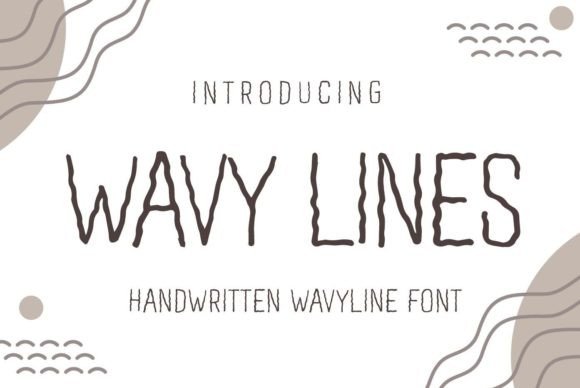
Wavy Lines is a display font in the truest sense—a delicate, well-rounded handwritten typeface that carries the warmth of a personal touch. It’s not a font that shouts. It whispers. The letters flow with a gentle rhythm, like handwriting that’s been carefully refined for clarity and charm. It works beautifully for projects that need authenticity, like wedding invitations, birthday cards, or personal branding elements. But I wanted to see how it would perform in a digital editorial setting.
Using Wavy Lines in Real Editorial Layouts
For the blog header, I used Wavy Lines in a soft charcoal tone over a linen-textured background. Instantly, the design felt more intimate. The font’s subtle curves and slight variation in line weight gave the header a crafted feel, as if someone had drawn it by hand. I found it especially effective for article titles and section headers—places where the goal is to guide the reader’s eye without overwhelming the content.
It also worked well in a recent recipe ebook I designed. I used Wavy Lines for the chapter openers and pull quotes, where it added a personal, almost handwritten charm. It didn’t distract from the clean layout of the recipes themselves, which were set in a crisp serif font. Instead, it created a visual rhythm—soft and elegant in the right places, structured and readable where it mattered most.
Visual Hierarchy and Reader Engagement
One of the most important aspects of editorial design is creating a clear visual hierarchy. Wavy Lines excels in supporting that structure, but not as a workhorse font. It shines in short bursts—titles, subtitles, pull quotes, and decorative accents. It doesn’t lend itself to long-form body text, but that’s not its purpose. It’s a display font, meant to draw attention and add character to key moments in your layout.
In a digital magazine layout I recently tested, I used Wavy Lines for the cover title and section headers. Paired with a clean, modern sans serif for subheadings and a traditional serif for body copy, it created a layered, editorial feel. The font’s natural rhythm and soft curves gave the publication a warm, approachable tone—perfect for a quarterly digital magazine focused on creativity and well-being.
Readability Across Formats
When working with display fonts like Wavy Lines, it’s important to consider how they’ll perform across different reading environments. On screen, the font holds up well at medium to large sizes. It’s less ideal for small mobile text, but that’s expected for a script font. In printables and PDF guides, it reads beautifully—especially when used for titles and decorative elements.
I tested it in a printable planner layout, where it was used for weekly headers and motivational quotes. The font added a soft, encouraging tone that complemented the planner’s theme of reflection and growth. In newsletter headers, it brought a sense of warmth and authenticity to the brand’s voice, without compromising clarity.
Font Pairing for Editorial Design
One of the joys of working with Wavy Lines is discovering how it pairs with other typefaces. Since it’s a handwritten display font, it benefits from being paired with something more structured. I found success using it with serif fonts like Playfair Display or Lora for body copy, which created a balanced contrast between elegance and readability.
For captions, navigation bars, or data-heavy sections, a clean sans serif like Lato or Open Sans provided a modern counterpoint. This kind of thoughtful pairing helps maintain a cohesive brand identity while ensuring the content remains accessible and easy to follow.
Practical Considerations for Using Wavy Lines
Before incorporating Wavy Lines into any publication, it’s important to check what’s included in the font package. Most premium display fonts come with multiple styles, ligatures, and alternates that can add depth to your design. I made sure to use the stylistic sets that offered a more varied baseline, giving the text a natural, hand-drawn feel.
Also, verify that the font supports multilingual characters if your content includes non-English words or phrases. Wavy Lines typically includes a wide range of glyphs, but it’s always good to double-check before using it in international publications or digital downloads.
Finally, review the licensing terms. If you’re using Wavy Lines in a commercial project—like an ebook template, a paid newsletter, or a printable planner—it’s essential to ensure you have the correct commercial font license. Most premium fonts offer this, but it’s a step that’s easy to overlook until later.
Final Notes on Wavy Lines
As I wrapped up the lifestyle blog redesign, I realized how much Wavy Lines had contributed to the overall tone of the project. It wasn’t just a font choice—it was a design decision that helped shape the reader’s experience. The font brought a sense of warmth and intimacy that aligned perfectly with the blog’s voice.
Whether you’re designing a digital magazine, a coaching workbook, or a wedding guide, Wavy Lines offers a quiet elegance that enhances the editorial mood. It’s a font that invites the reader in, subtly guiding them through the content with a soft, personal touch. And in a world of increasingly automated design, that kind of warmth can make all the difference.