Violinist Font: A Vintage Script for Digital Charm
Finding the Right Typeface for a Boutique Coaching Website
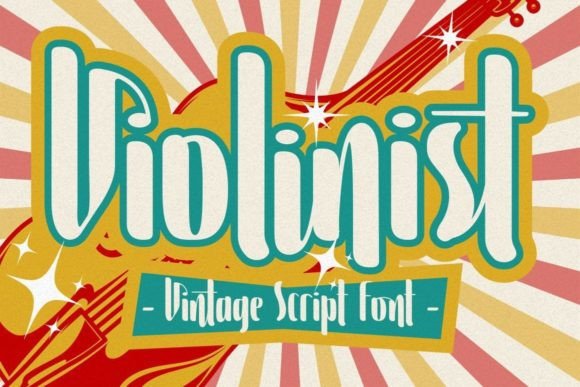
I recently worked on a branding refresh for a life coaching client who wanted a digital presence that felt warm, personal, and a little nostalgic. The challenge was to balance that emotional tone with clean usability. I came across Violinist, a vintage script font that immediately caught my eye. As a display font inspired by classic billboards, it carries a hand-drawn charm that felt perfect for the brand’s “authentic journey” messaging. I decided to test it in the hero section, a few key headings, and the logo design to see how it would perform across the site.
Visual Personality and Digital Performance
Violinist is a script font with a slightly irregular shape, giving it that vintage, almost hand-lettered look. It’s not overly ornate like some decorative fonts, which makes it more readable in digital spaces. The strokes have a gentle bounce, and the ligatures add a natural flow that mimics real handwriting. On screen, it rendered beautifully at larger sizes—especially in the hero section where it paired with a soft watercolor background. The font’s texture added depth without competing with the imagery, and the contrast between the script and a clean sans serif body font created a clear visual hierarchy.
When I tested it on mobile, I was pleased to find that the letterforms held up well even on smaller viewports. The slight irregularity didn’t cause any visual distortion, and the spacing remained legible. I did notice, however, that at very small sizes—like in navigation links or form labels—it became harder to read. This reinforced that Violinist is best used as a display font rather than for long-form or interface-heavy content.
Best Use Cases for Violinist in Web Design
I found the most success using Violinist in the following areas:
- Hero Titles – It worked beautifully as the main headline above the fold, especially with a light overlay or simple background.
- Call-to-Action Headlines – In a promotional banner for a free guide download, the font added a personal, inviting touch.
- Logo Design – Customizing the font for the client’s logo gave it a handcrafted feel that stood out in the header and favicon.
- Section Headers – Used sparingly in feature sections, it added visual interest without overwhelming the layout.
- Testimonial Pull Quotes – When styled with a bit of letter spacing and a soft drop shadow, it elevated the quote styling.
It also performed well on image overlays, especially when I used a semi-transparent background or stroke effect to ensure readability. For landing pages, I found it worked best when paired with a neutral, high-contrast color palette—think deep navy on cream or charcoal on white.
Readability and Responsive Design Considerations
One of the first things I checked was how Violinist handled different screen sizes. On desktop, it looked elegant and intentional. On mobile, I made sure to limit its use to headlines and decorative accents. I avoided using it for anything smaller than 24px, and even then, only for short phrases. For example, in a testimonial carousel, I used it for the client’s name but not for the full quote body.
Another consideration was background contrast. On dark backgrounds, the font’s fine strokes occasionally got lost, so I adjusted the letter spacing and added a subtle text shadow. On light backgrounds, it needed no enhancement and looked crisp and intentional. I also tested it in a few different font weights and found that the regular weight was most legible across devices.
For accessibility, I made sure not to use Violinist in any areas where readability was critical—like form labels, navigation menus, or technical instructions. While it adds charm and personality, it’s not a font that should carry the full reading load of a site. It works best when used for short bursts of visual impact.
Font Pairing and Brand Consistency
To maintain readability and balance, I paired Violinist with a clean sans serif font like Open Sans or Montserrat. This helped establish a clear typographic system where the script was used for emotional appeal and the sans serif handled the informational content. Occasionally, I swapped in a serif font like Merriweather for more editorial-style layouts, especially in blog headers or service pages.
The font also supported brand consistency across both web and downloadable assets. Since the client offered a free PDF guide, I made sure to use Violinist in the title page and headers to keep the look and feel cohesive. I checked that the font had multilingual support and commercial licensing, which was important for both the website and downloadable templates.
It’s also worth noting that Violinist includes ligatures and alternate characters, which I used to customize the logo and a few key headers. These small touches helped the brand feel more unique and handcrafted, rather than generic or templated.
Limitations and Recommendations
While I loved working with Violinist, it’s not a one-size-fits-all solution. It doesn’t perform well in:
- Body Copy – The script style becomes tiring to read over long paragraphs.
- Navigation Menus – Letters like “e” and “s” can blend together at small sizes.
- Forms and Labels – Clarity is key in UI elements, and this font sacrifices some precision for style.
- Dashboard Interfaces – For data-heavy or functional pages, a more neutral font is better suited.
Before using it on a live site, I recommend checking the font’s web-ready formats—especially if you're using it via a CDN or self-hosting. I used the WOFF2 format for faster load times and confirmed that the font rendered consistently across browsers and devices.